使用 BFS 查找图的顶点
在本练习中,您将修改 BFS 算法以在图中搜索给定顶点。
为便于测试您的代码,下面的图已通过字典加载。
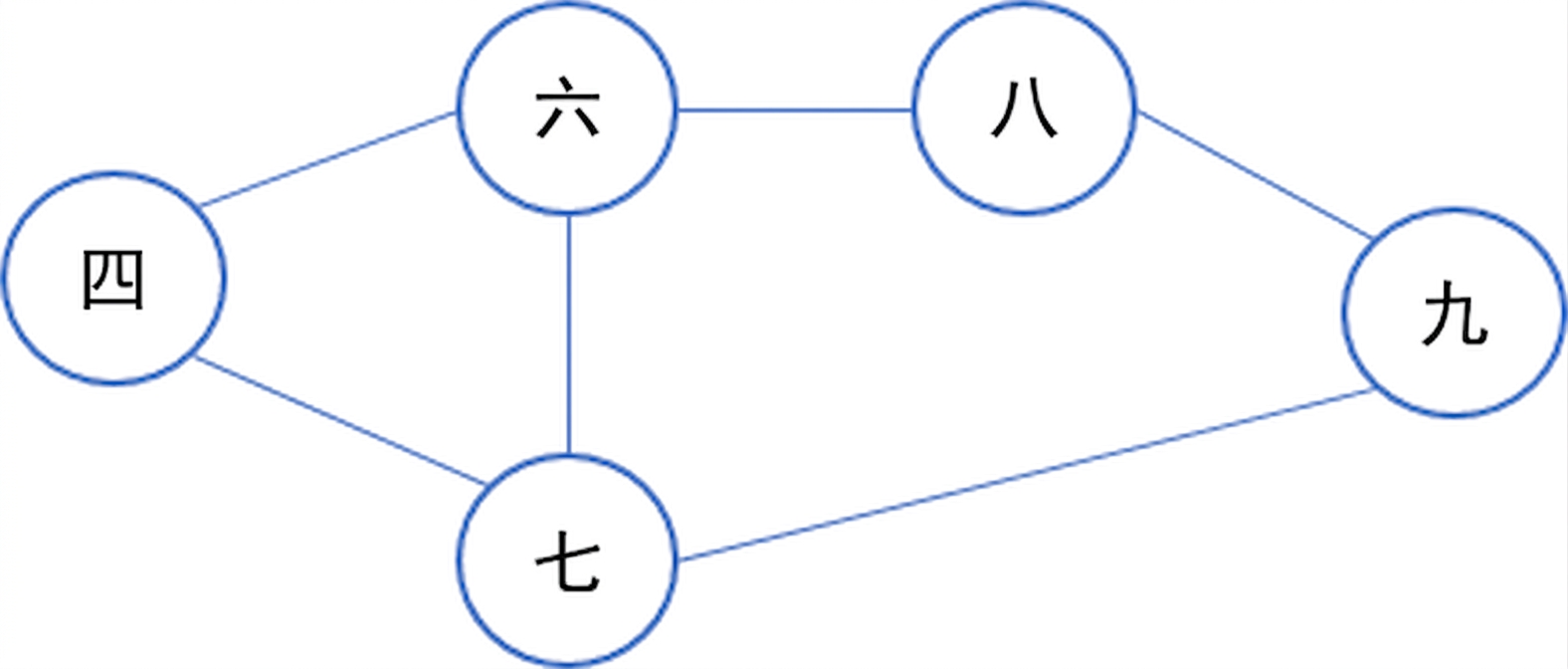
graph = {
  '4' : ['6','7'],
  '6' : ['4', '7', '8'],
  '7' : ['4', '6', '9'],
  '8' : ['6', '9'],
  '9' : ['7', '8']
}
本练习是课程的一部分
Python 中的数据结构与算法
练习说明
- 检查是否找到了搜索值。
- 如果找到搜索值,则返回
True。 - 在
for循环中,检查相邻顶点是否已访问。 - 如果未找到搜索值,则返回
False。
交互式实操练习
通过完成这段示例代码来试试这个练习。
import queue

def bfs(graph, initial_vertex, search_value):
  visited_vertices = []
  bfs_queue = queue.SimpleQueue()
  visited_vertices.append(initial_vertex)
  bfs_queue.put(initial_vertex)

  while not bfs_queue.empty():
    current_vertex = bfs_queue.get()
    # Check if you found the search value
    if ____:
      # Return True if you find the search value
      ____
    for adjacent_vertex in graph[current_vertex]:
      # Check if the adjacent vertex has been visited
      if adjacent_vertex not in ____:
        visited_vertices.append(adjacent_vertex)
        bfs_queue.put(adjacent_vertex)
  # Return False if you didn't find the search value
  ____

print(bfs(graph, '4', '8'))