建立階層式資料模型
在本練習中,你將透過建立 IT 資產的階層,來構建一個簡單的階層式資料模型。資產可以是 Hardware 或 Software。Software 資產又可細分為 Application 或 Tools,依此類推。階層如下圖所示。
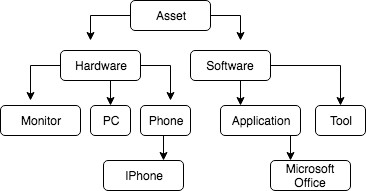
若要刻畫這個階層,需要合適的資料結構。可以使用由子紀錄 ID 與父紀錄 ParentID 組成的資料模型來達成。ID 為 1 到 10 的連續數值。
你的任務是建立對應的 Equipment 資料表,並將資產 Software、Monitor 與 Microsoft Office 插入表中。請記得為每個資產設定正確的 ID,以達成預期的資產階層。
本練習屬於課程
SQL Server 的階層式與遞迴查詢
練習說明
- 定義欄位
ID與ParentID的型別為INT。ID不可為NULL,ParentID可以為NULL。 - 以正確的 ID 將設備
Software插入資料表。此軟體隸屬於Asset。 - 以正確的 ID 將設備
Monitor插入資料表。此顯示器隸屬於Hardware。 - 以正確的 ID 將設備
Microsoft Office插入資料表。此軟體隸屬於Application。
動手互動練習
試著完成這個範例程式碼,體驗一下這個練習。
CREATE TABLE Equipment (
    -- Define ID and ParentID
	___ ___ NOT NULL,
    Equipment VARCHAR(255) NOT NULL,
    ___ ___
);

INSERT INTO Equipment VALUES (1,'Asset',NULL);
INSERT INTO Equipment VALUES (2,'Hardware',1);
-- Insert the type Software
INSERT INTO Equipment VALUES (___,____,1);
INSERT INTO Equipment VALUES (4,'Application',3);
INSERT INTO Equipment VALUES (5,'Tool',3);
INSERT INTO Equipment VALUES (6,'PC',2);
-- Insert the type Monitor
INSERT INTO Equipment VALUES (___,'Monitor',2);
INSERT INTO Equipment VALUES (8,'Phone',2);
INSERT INTO Equipment VALUES (9,'IPhone',8);
-- Insert the type Microsoft Office
INSERT INTO Equipment VALUES (___,___,4);

SELECT *
FROM Equipment;