İlk Firehose akışını oluştur
Artık tüm parçalar hazır olduğuna göre, ilk Firehose teslim akışını oluşturmaya hazırsın. Bu sayede verileri akışa gönderebilecek ve akış bu verileri S3 kovasına yerleştirecek.
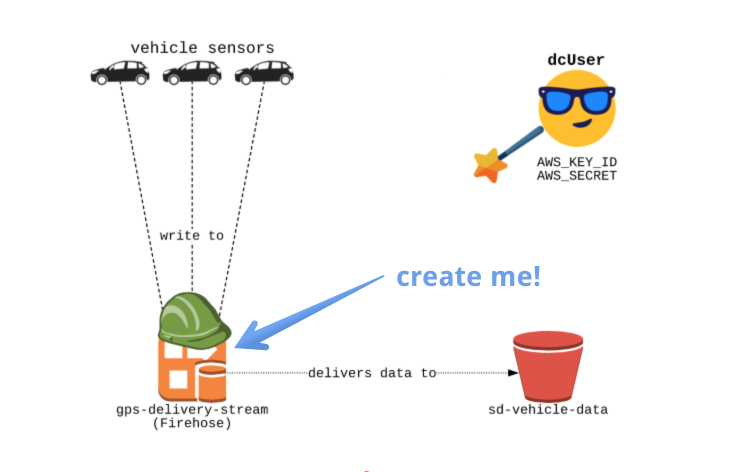
Kurulum
_setup.py adlı bir dosyaya dikkat et; bu dosyada firehose ve s3 için boto3 istemcilerini oluşturacağız.
Egzersizler için bu dosyayı düzenlemen gerekmiyor ama dilersen okuyabilirsin!
Düzenlenecek dosya
Editörde create_firehose.py dosyasını düzenleyeceksin.
Hedef S3 Kovası
Akışımız için hedef olarak kullanılacak "sd-vehicle-data" adlı bir S3 kovası oluşturacaksın.
Rol
Oluşturduğumuz rol "fireHoseDeliveryRole" ve ARN değeri: "arn:aws:iam::0000000:role/firehoseDeliveryRole".
Bu rol, yeni Firehose akışımızın "sd-vehicle-data" kovasına yazmasına izin verecek.
Slaytlar
Unutma — sağ üstteki Slaytlar simgesine tıklayarak slaytları her zaman görebilirsin; oldukça yardımcı olacaklar!
Bu egzersiz, kursun bir parçasıdır
AWS Kinesis ve Lambda ile Akış Verileri
Uygulamalı etkileşimli egzersiz
Teoriyi etkileşime dönüştürün, interaktif egzersizlerimizden biriyle
 Egzersize başla