Inserire un nodo in un albero binario di ricerca
Nel video, hai visto cosa sono gli alberi binari di ricerca (BST) e come implementarne le operazioni principali.
In questo esercizio, implementerai una funzione per inserire un nodo in un BST.
Per testare il tuo codice, puoi usare il seguente albero:
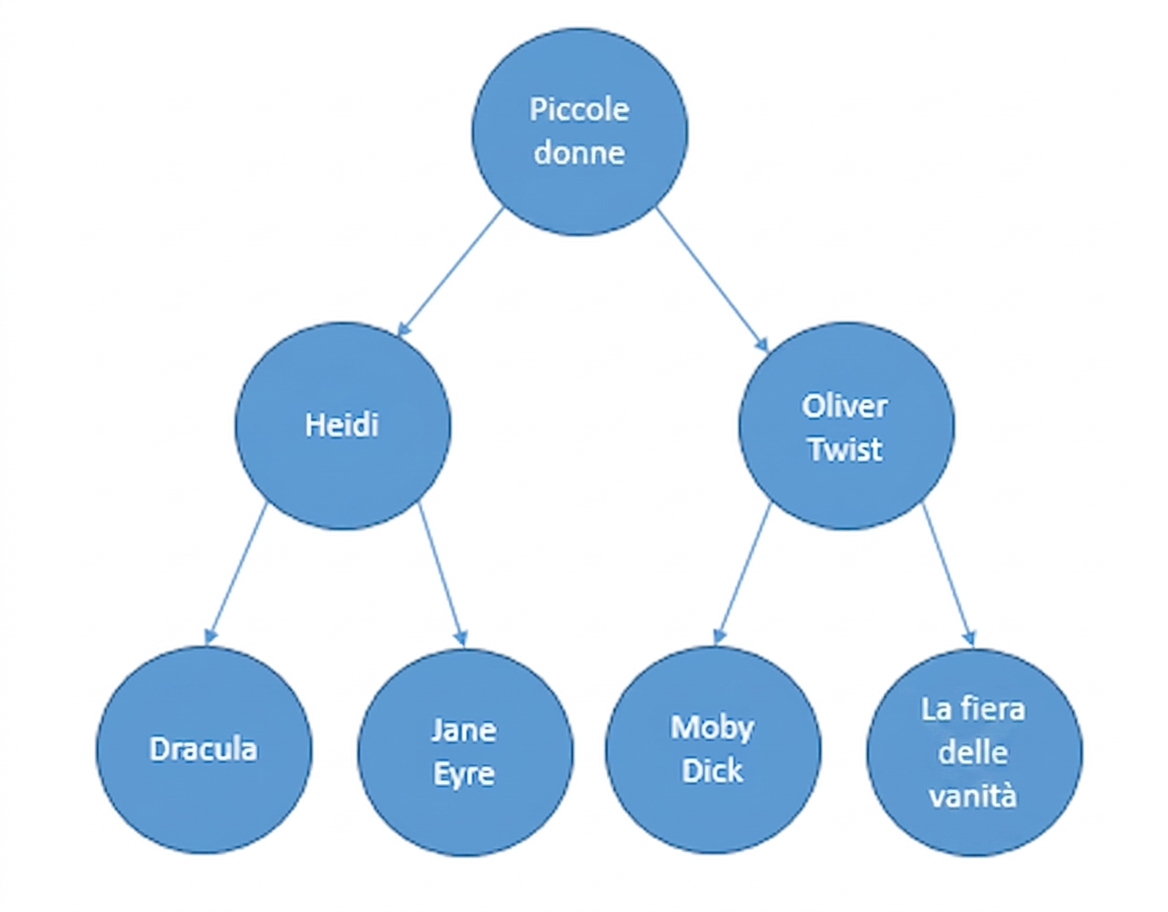
I nodi contengono titoli di libri, costruendo un BST basato sull'ordine alfabetico.
Questo albero è stato precaricato nella variabile bst:
bst = CreateTree()
Puoi verificare se il nodo è stato inserito correttamente con questo codice:
bst.insert("Pride and Prejudice")
print(search(bst, "Pride and Prejudice"))
Questo esercizio fa parte del corso
Strutture dati e algoritmi in Python
Istruzioni dell'esercizio
- Verifica se il BST è vuoto.
- Verifica se il dato da inserire è minore del dato del nodo corrente.
- Verifica se il dato da inserire è maggiore del dato del nodo corrente.
esercizio interattivo pratico
Prova questo esercizio completando questo codice di esempio.
class BinarySearchTree:
  def __init__(self):
    self.root = None

  def insert(self, data):
    new_node = TreeNode(data)
    # Check if the BST is empty
    if ____ == None:
      self.root = new_node
      return
    else:
      current_node = self.root
      while True:
        # Check if the data to insert is smaller than the current node's data
        if ____ < ____:
          if current_node.left_child == None:
            current_node.left_child = new_node
            return
          else:
            current_node = current_node.left_child
        # Check if the data to insert is greater than the current node's data
        elif ____ > ____:
          if current_node.right_child == None:
            current_node.right_child = new_node
            return
          else:
            current_node = current_node.right_child

bst = CreateTree()
bst.insert("Pride and Prejudice")
print(search(bst, "Pride and Prejudice"))