Xây dựng báo cáo nền tảng
Bây giờ, hãy xây dựng báo cáo nền tảng cho trực quan hóa này:
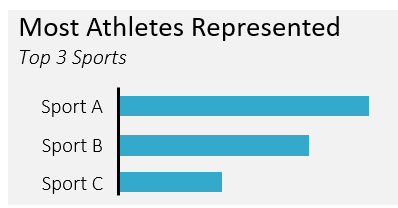
Bạn sẽ truy vấn bảng summer_games, có trong explorer ở góc dưới bên phải.
Bài tập này là một phần của khóa học
Lập báo cáo trong SQL
Hướng dẫn bài tập
- Dùng bảng điều khiển bên phải để chọn trường
sporttừ bảngsummer_games. - Tạo trường
athletesbằng cách đếm số lần xuất hiện khác nhau củaathlete_id. - Group theo trường
sport. - Chỉ hiển thị 3 hàng trong báo cáo, với
athletescao nhất ở trên cùng.
Bài tập tương tác thực hành trực tiếp
Hãy thử làm bài tập này bằng cách hoàn thành đoạn mã mẫu này.
-- Query the sport and distinct number of athletes
SELECT
	____,
    ____ AS athletes
FROM summer_games
GROUP BY ____
-- Only include the 3 sports with the most athletes
ORDER BY ____
LIMIT ____;