Building the base report
Now, build the base report for this visualization:
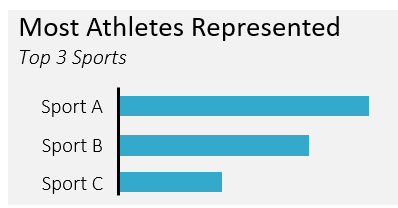
This should be built by querying the summer_games table, found in the explorer on the bottom right.
This exercise is part of the course
Reporting in SQL
Exercise instructions
- Using the console on the right, select the
sportfield from thesummer_gamestable. - Create
athletesby counting the distinct occurrences ofathlete_id. - Group by the
sportfield. - Make the report only show 3 rows, with the highest
athletesat the top.
Hands-on interactive exercise
Have a go at this exercise by completing this sample code.
-- Query the sport and distinct number of athletes
SELECT
	____,
    ____ AS athletes
FROM summer_games
GROUP BY ____
-- Only include the 3 sports with the most athletes
ORDER BY ____
LIMIT ____;