Rotations
In cases where an object is angled or flipped, the image can be rotated. Using ndi.rotate(), the image is rotated from its center by the specified degrees from the right horizontal axis.
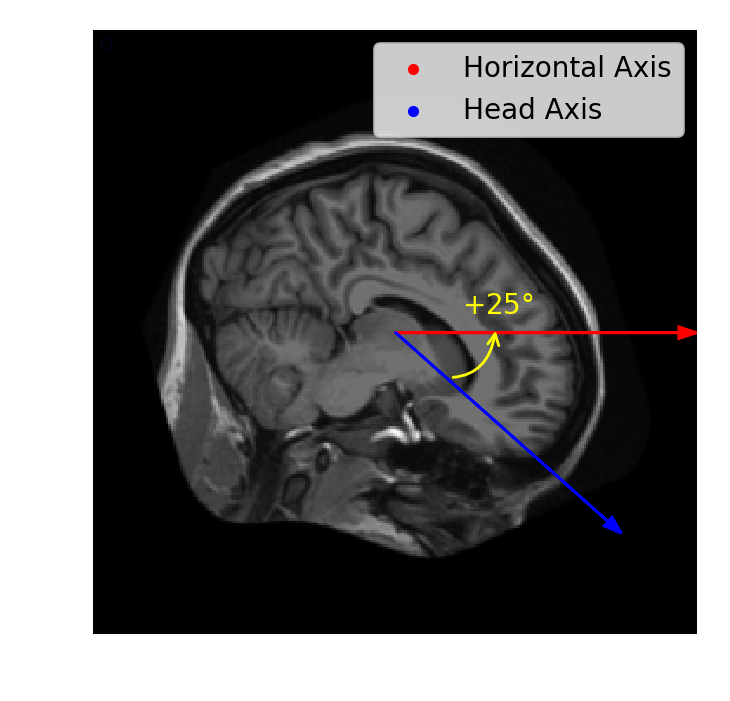
For this exercise, shift and rotate the brain image (im) so that it is roughly level and "facing" the right side of the image.
This exercise is part of the course
Biomedical Image Analysis in Python
Exercise instructions
- Shift
imtowards the center: 20 pixels left and 20 pixels up. - Use
ndi.rotateto turnxfm30 degrees downward. Setreshape=Falseto prevent the image shape from changing. - Plot the original and transformed images.
Hands-on interactive exercise
Have a go at this exercise by completing this sample code.
# Shift the image towards the center
xfm = ____

# Rotate the shifted image
xfm = ndi.rotate(____, angle=____, reshape=____)

# Plot the original and rotated images
fig, axes = plt.subplots(2, 1)
axes[0].imshow(im)
____
format_and_render_plot()